
Last Updated January 13, 2023
Disclosure: This post may contain affiliate links, meaning I may earn a commission if you purchase or sign up through my links (at no extra cost to you). Please read my disclaimer for more info.
Can Merch Informer actually help you earn with Merch by Amazon—and does it justify the cost? In this in-depth Merch Informer review, we’ll break down what it does, who it’s for, and how it can fit into your strategy.
The internet is packed with opportunities for people who want to make money online. There are many legitimate methods available, but the most consistent results usually come from focus, patience, and steady execution.
Some approaches require specialized skills, while others mainly demand time, experimentation, and persistence.
One popular route is building passive income streams—income that can continue coming in with minimal ongoing effort once the foundation is set.
That said, most passive income models require upfront work (and sometimes upfront investment) to get traction.
Amazon has become a major source of online income for many entrepreneurs—especially those aiming to build longer-term, semi-passive revenue.
There are multiple ways to earn through Amazon, and Merch by Amazon is one of the most accessible options. To compete effectively, however, research and workflow tools like Merch Informer can make a big difference.
Below is a comprehensive Merch Informer review to help you understand the tool and decide whether it’s a good fit—especially if you want a simpler path to getting started.
Merch Informer Review: Making Money on Amazon
In this section, we’ll take a closer look at how Merch Informer can support your Merch by Amazon workflow—without adding unnecessary complexity.
But before we dive in, let’s quickly cover the basics.
What is Merch by Amazon?
Merch by Amazon is an apparel-on-demand program run by Amazon. It’s designed to let creators upload designs and sell them on products like t-shirts and hoodies—without managing inventory.
Your main job is the creative side: producing designs, selecting colors, and choosing text or graphics that will appear on the products.
After you upload your designs, Amazon reviews them. Once approved, the listings go live. When customers place orders, Amazon handles the printing, fulfillment, and shipping.
For each sale, you earn a royalty (a commission based on the product price). Amazon keeps the remaining portion to cover production and delivery.
If you’d like to learn more about earning online, you can also explore other ways to make extra income as you build your strategy.
What is Merch Informer
Merch Informer is a research and productivity platform built for Merch by Amazon sellers. Its goal is to simplify what can be the hardest parts of the process: figuring out what’s selling, spotting trends, and organizing your workflow.
It pulls and organizes useful data so you can move faster—helping you research niches, generate keyword ideas, and keep your designs structured for better consistency.
Instead of manually digging through endless listings, Merch Informer helps you quickly narrow down what matters.
In short: Merch Informer gives sellers clearer signals so they can create better listings and make smarter decisions. The sections below walk through its core features and how people typically use them.
Challenges with Merch by Amazon
Like any competitive online program, Merch by Amazon comes with real challenges. Because the platform is popular, many niches are crowded—and standing out can be difficult.
Even when a niche looks broad, many designs and angles are already saturated. That makes differentiation and research more important than most beginners expect.
There’s also the risk of unintentionally infringing on trademarks. With so many existing products, it’s surprisingly easy to create something that overlaps with protected terms—and Amazon takes violations seriously.
On top of that, your listings need to be discoverable. That means doing keyword research and choosing terms that help your products show up in Amazon searches.
Finding low-competition, high-intent keywords can be tough without a dedicated tool—especially if you’re doing everything manually.
That’s exactly where Merch Informer aims to help: it’s designed to reduce guesswork and make these steps more manageable.

Merch InformerOffer:
20% discount with code FINANCIALWOLVESMerch Informer is built for Merch by Amazon sellers and helps you research what’s trending, identify promising keywords, and streamline your workflow.Signup to make money on Merch by Amazon
How Merch Informer Can Help to Make More Money
If your goal is to improve sales and make better decisions on Amazon Merch, Merch Informer can be a practical toolkit. It focuses on the research and organization side—two areas that often determine whether sellers gain traction.
So how does it work in practice? Let’s look at the key features and what each one is meant to do.
1. Product Search
This feature helps you analyze what’s currently selling and why. You can identify popular design themes, see typical price ranges, and understand which audiences a product appears to target.
When used consistently, product research like this can save time and help you focus your efforts on niches with actual demand.
2. Keyword Finder
Keyword Finder is designed to help you uncover Amazon keyword ideas, including terms that are popular and those that may have lower competition.
The aim is to find keywords that customers search for—but that aren’t overly dominated by sellers with hundreds of listings.
3. Merchant Search
With Merchant Search, you can review the performance patterns of a merchant or brand. This can highlight what’s working for them and reveal repeatable themes across their best-performing products.
These insights can help you refine your niche direction and improve your positioning.
4. Favorites
Favorites lets you save design examples you want to revisit later. This is useful for collecting inspiration and building a reference library over time.
You can also categorize favorites by niche or keyword, which makes it easier to stay organized and produce designs more consistently.
Yet another great provision on Merch Informer is the ability to store and sort what you want to study later.
5. Advanced Competition Checker
This tool helps you estimate how difficult it may be to rank for a keyword. In general, the best targets are terms with solid demand and a competition level that still gives new listings a chance.
Ranking higher can increase visibility, which can translate to more clicks and more sales.
6. Merch Informer Academy and Resources
Merch Informer also includes training materials through its academy resources. These lessons can help both beginners and experienced sellers tighten their approach.
Instead of relying on guesswork, you can follow a clearer process and improve faster.
Step by Step Guide to Get Started With Merch Informer
Once you sign up, you’ll have access to several tools designed to make research and creation easier. Here’s a practical walkthrough for getting started and building momentum.
Step 1: Watch Video Resources
After logging in, you’ll typically land on a dashboard. It includes training videos that explain how each feature works and how sellers commonly use the workflow.
Start by watching the videos in order so you understand the basics before running deeper research.

Step 2: Performing a Product Search
On the left side, you’ll find the feature list. Choose Product Search and enter the niche keyword you want to explore.
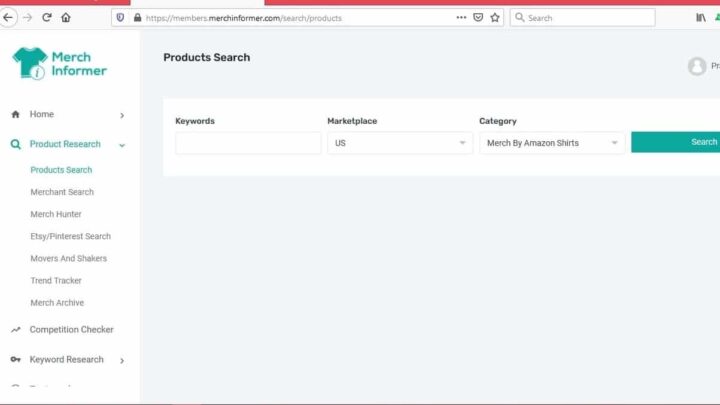
After a short moment, you’ll see results including your query, price range (low/high/average), and product details. You may also see average BSR (Best Sellers Rank) information, depending on the view.
Scroll further to find related products and a data breakdown that can help you evaluate the niche more realistically.

To uncover early signals, it often helps to begin with broad terms (for example, “cartoons” or “sports”). You can refine later once you identify angles that look promising.
Then click the Merch Hunter button to generate a list of top keywords related to your seed term.
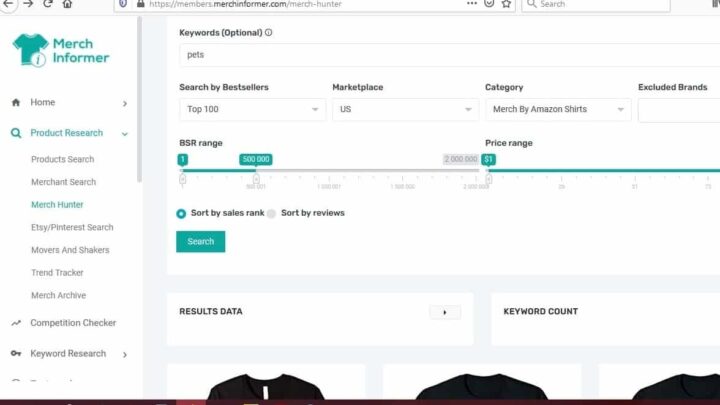
You can expand the BSR range (for example, to 100,000 and above) to capture a wider view and avoid overly “perfect” results that may not reflect typical demand.

Once you see the top sellers in that niche, you can start narrowing down: identify the most common themes, compare pricing, and decide whether the niche looks profitable enough to pursue.
Step 3: Confirm that Your Data is Valid
After selecting keywords or phrases, it’s smart to check for trademark risk before building designs around them. Click Trademark Alerts and search the words you plan to use.
To dig deeper, you can click through to trademarkia.com for details.

Step 4: Design Your Shirt
Once your research and checks are done, you can move into the design phase using Merch Informer’s designer tools.
Click your profile name in the top-right area and follow the link to the Merch Informer Products Designer Page.
You’ll see multiple templates (t-shirts, hoodies, phone cases, jewelry cards, and more).
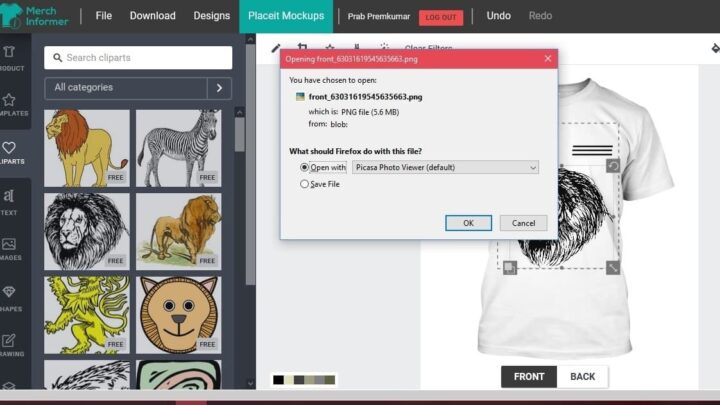
Select a template and you’ll be taken to an editor where you can add text/images, adjust colors, and fine-tune layout.

You can experiment with many elements, including text styles, shapes, clip art, and drawing tools—so you can create a design that matches your niche angle.

For images, you can browse the built-in clip art library or upload your own assets. Even if you’re not an illustrator, you can still build clean designs using available resources (always verify usage rights for any external assets you upload).
See related: How to Make Money with Merch by Amazon
Step 5: Download and Save Your Designs
Don’t be afraid to test multiple variations. When you’re happy with your design, click Download to save it to your computer.
Then submit your designs to Merch by Amazon for approval and publishing. If you’re exploring other Amazon-related options, you can also check out jobs similar to Amazon Flex for additional ideas.
Merch Informer Pros and Cons
Pros
1. Trademark Protection
Trademark problems can lead to listing removal—or worse. Merch Informer’s checks help you reduce the risk of using protected terms unknowingly.
2. Hotkeys
Hotkeys can speed up navigation and repetitive tasks, making it easier to work through listings and research faster.
3. Time-saving
Research tasks like keyword discovery and niche validation can be done more quickly than manual searching—often saving hours over time.
4. Chrome Extensions
Merch Informer includes Chrome extensions that provide quick access to insights while browsing, helping you keep workflow smoother.
5. Affordable Entry Plan
The entry-level plan is relatively low-cost compared to many research tools, which can make it appealing for newer sellers testing the waters.
6. Beginner-friendly Interface
The UI is designed to present data clearly, which helps you make decisions without drowning in complicated dashboards.
7. Analytics
Merch Informer can provide additional analytics-style insights beyond what some sellers rely on inside Amazon alone.
Cons
1. Potential for Misuse
Like many research tools, it can be used responsibly—or abused. Some sellers may try to copy designs based on competitor research, which is not recommended.
2. Feature Limits on Lower Plans
Lower-tier plans may restrict access to certain features (for example, deeper tracking), which could matter as you scale.
3. Credit Card Required for Trial
Some users may dislike entering payment details upfront, even if a free trial is offered.
4. Learning Curve
Although it’s straightforward, you’ll still need time to learn the workflow, understand the data, and apply it effectively.
How to Signup Merch Informer with the 20% discount?
Overall, Merch Informer can be a solid choice if you want a more structured approach to researching niches and keywords. Signup MerchInformer.com with coupon code FINANCIALWOLVES to get a 20% discount. If you apply what you learn consistently, you’ll be in a much better position to start earning with Merch by Amazon.
Merch InformerOffer:
20% discount with code FINANCIALWOLVESMerch Informer helps Merch by Amazon sellers research trends, validate keywords, and streamline creation—especially when you want to reduce guesswork.Signup to make money on Merch by Amazon